Local, browser-based file transfers for Android TV and Google TV
Experience a practical file-transfer bridge: Secreto Hub, from SecretoTools, turns Android TV devices into local file receivers to simplify TV-bound transfers. The app uses a browser-based sender so any phone, tablet, or computer can upload photos, videos, music, documents, or APKs to the TV over a shared local network without extra software. QR-code pairing, on-screen transfer progress, multi-file support, and a D-pad-optimized UI help recipients manage transfers directly on the television. It targets Android TV and Google TV owners who need private, fast on-home transfers.
How the app turns a television into a local file receiver
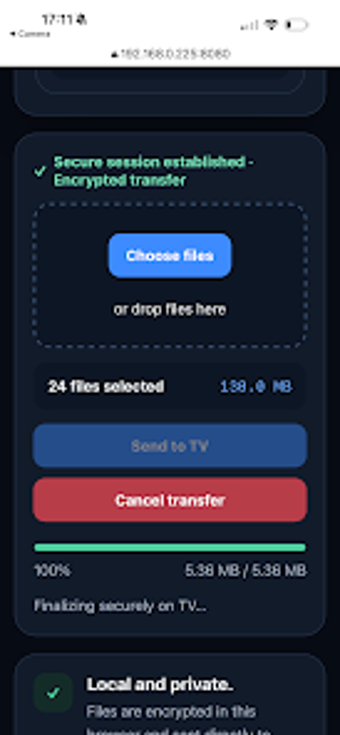
The app converts the TV into a receiver that accepts uploads from any web browser on the same network. Setup shows a local IP address and a QR code on the television, and the browser-based sender requires no installation on the source device. Supported file types include photos, videos, music, documents, and APKs, and the app stores received items for easy access inside its TV-facing interface.
Are transfers restricted to the local network and kept private?
The app routes all traffic across the local LAN only, so files do not leave the home for external storage. That model reduces latency compared with cloud uploads and aligns with the developer's privacy focus. Connection uses a local IP address or a QR code displayed on-screen to pair the sender's browser. Real-time progress appears on the television so recipients can monitor transfer status without switching devices.
Is the television interface designed for remote control operation?
The interface is designed for D-pad control and remote navigation rather than a direct port of a phone app. Menus expose received files, and transfer progress displays are readable on large screens. In addition, the app is described as lightweight, so it fits typical Android TV resource budgets and does not require a companion app on the sender. For routine media moves, operation is largely guided and requires minimal technical steps.
Who the app serves and the trade-offs of a local-only approach
The app suits owners who keep media and devices in the same household and prefer local control. Because it requires the sender and the TV to share the same Wi-Fi or Ethernet network, it lacks remote transfer capability found in cloud services. Compared with cloud-based alternatives, it trades off off-site access for privacy and lower latency. Larger multi-site or remote workflows are not supported by this local-only model.
The app is a pragmatic local-transfer choice for in-home media management
The app is a practical option for Android TV owners who prioritize private, on-home file movement and a TV-first interface. It excels at fast, local transfers and simple remote navigation. One important limitation: it does not provide remote or cross-network transfers, so users needing off-site sharing must seek other solutions. Use it for household media and APK delivery, for everyday use.